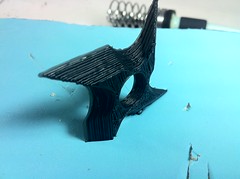
For Philly Tech Week, I will be showing visitors how to take a shape from Adobe Illustrator into the popular open source CAD program OpenSCAD and make a 3D model suitable for 3D printing.
I’m sure you know Illustrator. It’s the most successful vector drawing program <clarkson>in the world.</clarkson> OpenSCAD is less well known. It is best described as coding for objects. You make a solid with the function cube() and cut a cylinder() out of it with the difference() function, etc. But sometimes you want a more organic or complicated shape to start with. That’s where artist JK Keller stepped in and made a script that automates some of the process for you. What you need for this workshop:
- Laptop
- Adobe Illustrator
- OpenSCAD
- This script: https://github.com/jk-keller/Adobe-Scripts
- Some designs or ideas
There may not be time to print everyone’s design, but you should go home with something 3D printed.
Monday 4/22 5pm – 10
Gratis and Libre (free)
Hive76, suite 519915 Spring Garden St Philadelphia PA 19123
RSVP by commenting below.
 We will have an announcement and official start in the 3D Printer village at noon on Saturday. But the basic premise is this: