My Blade mCP X Mods

She ain't pretty, but she flies great

I’m a noob when it comes to RC helicopters. I got a Syma S107 for about $30 a year or two ago and it is incredibly stable while being ridiculously bulletproof. I can fly it into walls, and I’ve never replaced a part. If it’s laying on its side on the floor, I can often get it to right itself by just gunning the throttle. (Do I recommend it? No. Do I do it? Sometimes.) A wire fatigued off the board once but that was the only thing I’ve had to fix. It’s a hell of a bargain and it’s treated me great, but being so stable and easy to fly, it has some inherent performance limitations. So I decided to step up a few levels.

I heard about the Blade mCP X helicopter, the first “real” helicopter of its size that came stock with 3-axis attitude-holding stabilization electronics. It weighs maybe double what my S107 does but its performance is amazing. It can do inverted flight, flips, all sorts of crazy stuff. That is, when supplied with an appropriately-skilled pilot, which I certainly am not. But I can fly it in my backyard in 30 mph winds, and this little beast can take it — pretty impressive for something that weighs the same as a good quality 9V battery. Being such a noob, I crash constantly, but I can usually patch things up without needing to buy replacement parts. Here is the list of mods I’ve performed on my helo so far, mostly out of necessity:

  • Grommet mod – tightens up the swash, reduces vibration (not my idea). Works great
  • Tail boom from mCP X2 – comes with a more aggressive tail rotor which helps with yaw authority
  • Created a simple tool to speed up resetting the main gear after crashes – just remove the battery and push this drilled-out rod over the gear hub to click it back in place, no need to remove the canopy or landing gear. I keep it zip-tied to my transmitter since I crash a lot 🙂
  • Lengthened tail boom – added perhaps 1/2″, seems to help with yaw authority
  • Added magnetic breakaway tail boom mount – after a crash the tail boom pops off instead of breaking, can be reset by simply moving it back in place and letting the magnets lock it down. Works very well, but be careful because if you have too much slack then with the right kind of crash the tail motor wires can get wrapped around the head. I’m sure I’ll keep experimenting with this one
  • Masking tape holding my canopy together? Classy
  • Hot glue holding my landing gear together? Not perfect by any means, but it keeps me flying until I buy a spare
Aluminum piece presses into the helo frame like a stock tail boom, but has an embedded magnet. Tail boom is hot-glued to a piece of bamboo skewer that fits into the channel, and has a magnet glued to it using CA and baking soda. Rubberbands or o-rings might be better

Event: Art Hackathon @ Hive76, March 10th and 11th, 2012

Hive76’s Art Hackathon

March 10th and 11th, 3pm to 7pm

For the second weekend in March, Hive76 is hosting a day of smashing, cutting, gluing, taping, painting, and general making and frivolity. We’re calling it “Art Hackathon”. Inspired by the Bravo TV Series Work of Art, and following closely in the footsteps of Art Hack Day, the event will focus on the rapid creation of meaningful works of art out of a provided supply of recycled materials.

Hive76 will provide massive piles of cardboard, tubs of glue, masking tape, tubs of spackle, box cutter blades, and a few cans of various colors of spray paint, to let every participating individual or team create a work of their choosing. The works will be based on a single theme, to be announced at the beginning of the event.

The event is split across two, four-hour days. While participants are free to use the time as they wish, the time is designed to provide time for planning on and a moderate amount of building on the first day, with some drying and curing time overnight before finishing up the next day.

A fee of $25 per person will be charged at the door, to cover the cost of materials and food that will be provided during the event for both days. Please RSVP for the event before March 6th by emailing [email protected].

Crafty Computer …

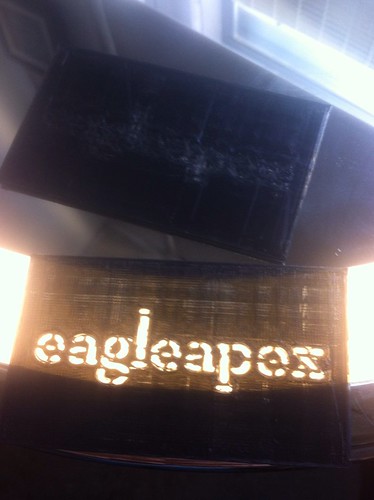
Back-lit view of paper and foil micro-controller board

After visiting The Hacktory’s “Soft Circuit” event, PJ and I were inspired to take a stab at making some micro-controller circuits using alternative, “high/low tech” approaches.  PJ made an MCU circuit using conductive paint (has potential, but needs some tweaks).  I opted to try a circuit board using metal leaf.  That happened to work on the first shot — although careful scrutiny of the picture on the left suggests there was some luck involved (there are holes in the circuit that come dangerously close to wrecking it). Continue reading “Crafty Computer …”

Saturday Open House

We’re doing an additional open house every week now. If you can’t make it on Wednesdays, or if you’d like an additional day to come and check us out, we’ll be there every Saturday starting at 2 PM.

Stop by and check out our 3D printer, our plethora of games, or come just to hang out, and/or work on your own project ideas.

Feb 22nd: Meet the Developers of Apostrophe Now!

Apostrophe Now!based out of Philadelphia and developed by P’unk Ave — is “a content management system designed for maximum flexibility with a minimal learning curve. The interface is ergonomic, all content-editing is performed in-context.”

Do you have or are you building a website, but you are looking for alternatives to WordPress, Django and other CMS engines? Apostrophe may be right for you!

Come meet Geoff DiMasi and Tom Boutell, two of the lead developers, and find out all the nitty gritty about Apostrophe. They’ll give an overview of the system, design goals, and features, and they’ll also dive into the code to show us how it’s all put together. Geoff and Tom will also talk about other things Philadelphia (the founding of P’unk Ave, the founding of Indy Hall, and the founding of Ignite Philly).

You won’t find this info on Youtube or Vimeo. Come on down to your favorite hackerspace to learn all about Apostrophe and an awesome Philadelphia success story.

Hive76
Wednesday, February 22nd, 7:30 pm
915 Spring Garden, Suite 519

P3D: 3D Model Viewer in the Browser, No Extensions Required

P3D.in is a new beta service (currently free, prolly will change) for rendering 3D models in the web browser, no flash or plugins required. I guess it works via HTML5?

They only take .obj files at the moment (which you can export to from Blender). It’d be much much more useful if they automatically imported STL files, and all of Thingiverse, among other sites. I’ve logged a bug report and feature request along these lines.

Here’s a yoda head converted to .obj and imported and hosted by P3D in their demo iframe. pretty cool. (NOTE: I guess it needs a while to load in the browser, apparently. So if it’s not showing up yet in your browser, give it a minute).

CONTROLS:
Left click and drag – rotate
middle click and drag – zoom
Right click and drag – translate

NASA: The Blue Marble, 2012 Edition

NASA: The Blue Marble, 2012. Click the image for full resolution.
NASA: The Blue Marble, 1972. Click the image for full resolution.

NASA today released a crazy high-res reconstructed photograph of the world, 61 megapixels (8,000 x 8,000)… we can finally replace the one from Apollo 17 from 1972.

Here are the deets.

A ‘Blue Marble’ image of the Earth taken from the VIIRS instrument aboard NASA’s most recently launched Earth-observing satellite – Suomi NPP. This composite image uses a number of swaths of the Earth’s surface taken on January 4, 2012. The NPP satellite was renamed ‘Suomi NPP’ on January 24, 2012 to honor the late Verner E. Suomi of the University of Wisconsin.

Suomi NPP is NASA’s next Earth-observing research satellite. It is the first of a new generation of satellites that will observe many facets of our changing Earth.

Suomi NPP is carrying five instruments on board. The biggest and most important instrument is The Visible/Infrared Imager Radiometer Suite or VIIRS.

Image Credit: NASA/NOAA/GSFC/Suomi NPP/VIIRS/Norman Kuring