

Early in my gameplay in Minecraft I began making redstone contraptions. For those that don’t know Minecraft, you can use resources in the game to make analog electronics. People have extended this feature to build entire working computers all in redstone logic in Minecraft.

I only used redstone to make traps and novel machines, but the strong connection between redstone and electronics led me to imagine extending these machines out into the real world. I figured the easiest thing to make was the Redstone Lamp, pictured to the right. The redstone lamp is a block that will provide light when powered. My real life replica redstone lamp does the same thing. It lights up when a redstone lamp ingame is lit up. Here is a video of how it works:
I’ll describe how I got to a working replica in a few stages.
Software
I am not the best getting started with software projects, so I enlisted the help of Vince who was hanging out a bunch at Hive76. We made a quick prototype with a python Minecraft client called pyCraft, an Arduino, and transistor, and a papercraft redstone lamp. You can see that first success here.
While I worked on the physical stuff, Vince moved away and Kyle Yankanich stepped in to help me finalize some stuff. PyCraft connects to any server as a simple chat client, in our case as the user LAMPBOT. Kyle wrote a plugin for pyCraft that listens for a whisper of “on” or “off” and sets pin 16 on the Raspberry Pi’s GPIO high or low respectively. You can download my fork of pyCraft here with Kyle’s plugin and my shell script to start the client. I set my home server to Offline mode so that I wouldn’t need to purchase another Minecraft account.
Hardware
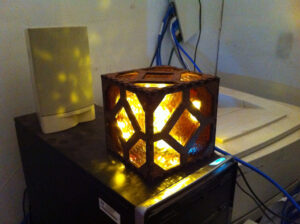
For the replica, I did my best to turn pixels into straight lines. I designed a laser-cuttable box in six parts with finger joints on the edges. I used 16 finger joints because the a block is 16 pixels wide. The material is MDF with a zebra wood veneer laminated on top. I laser cut six sides and glued all but one together. I acquired some amber cathedral glass from Warner Stained Glass, cut, and glued it in place with silicone adhesive. The RPi is attached to a MDF board sitting diagonally in the cube. The LEDs were torn from inside a failbot and glued around the RPi to light up the inside as much as possible.
In order to turn the LEDs on and off, we use the signal from the RPi GPIO to control an NPN transistor and turn the lights on and off. There is a fritzing wiring diagram of the electronics here. On the NPN transistor, the Collector is the negative lead from the LEDs, the Base is connected to a 100KΩ resistor and then pin 16, and the Emitter goes to the ground on the LED power supply.
There’s no room for a power regulator, so there are two power sources and ethernet running through a hole in the back.
Ingame Stuff
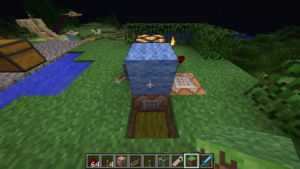
To trigger the lamp, command blocks are used ingame as you can see to the left. When a lever is thrown powering a specific redstone lamp, we also power a command block that sends the server command:
/tell LAMPBOT on
We also send the inverted signal to a different command block that outputs:
/tell LAMPBOT off
This can be used on any server with no mods. You would need a Minecraft account for the lamp so you don’t expose your server to cracked clients. The server this was designed for runs Minecraft 1.6.4 now, but in 1.7.2 the /testforblock command and a clock could also trigger the lamp.
I really hope you take what we have done here and continue to connect your Minecraft creations to the real world. Enjoy!
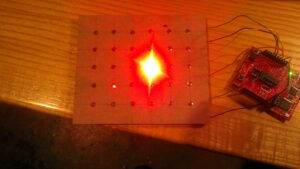 This 5×6 LED tile is a key component in a secret project that I’m developing (in secret) with some other folks (whose names shall remain a secret).
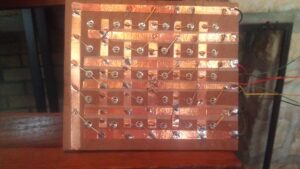 You need to flip the tile over in order to see what’s special about it. Here’s a quick list of features that make the assembly what it is:
